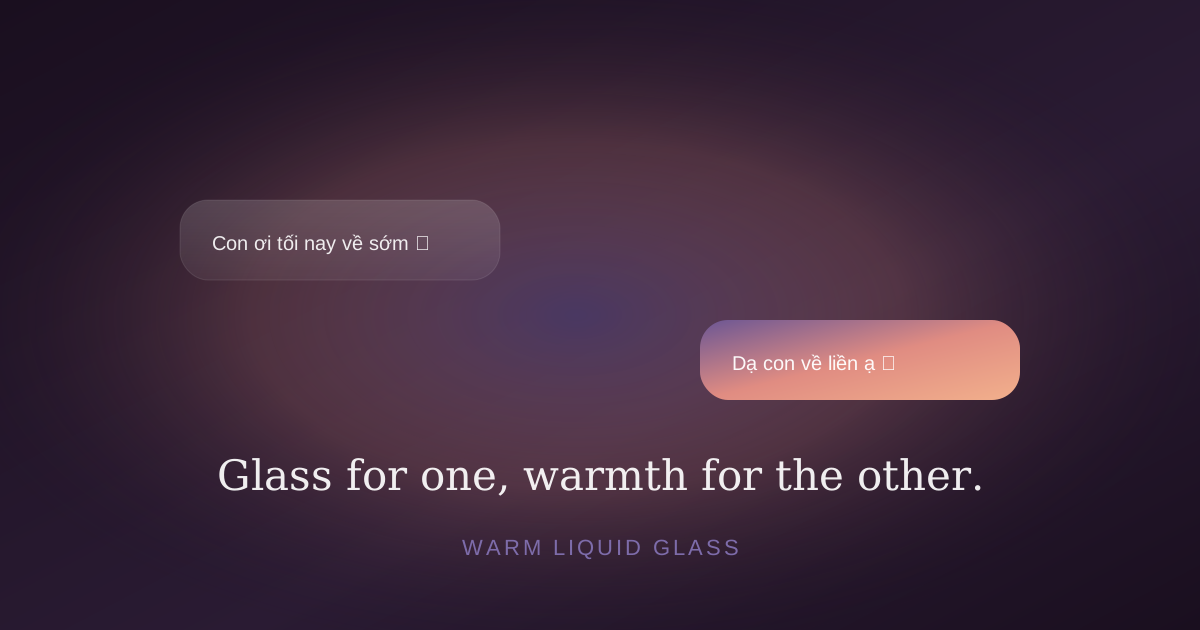
When iOS 26 introduced Liquid Glass, my first reaction was admiration. The second was: this looks too good for what we're building. Liquid Glass is engineered for clarity. We needed warmth.
Apple's defaults — .regularMaterial, .ultraThinMaterial— produce a neutral, vaguely cold transparency. They're designed to disappear into whatever background they're placed on. For a productivity app, perfect. For a chat app meant to feel like a warm living room, off.
The palette decision
We picked Dusk Knotos: soft plum (#6B5694), warm peach (#F2B08C), terracotta (#E08C82), sage (#A6B59E), cream (#FAF5ED) for light mode, plum-black (#1A0F1F) for dark.
No bright corporate blue. No system green. No safety-cone orange. Every color was tested for warmth — the rule was: does it feel like sunset on someone's living room wall?
Layering glass with warmth
The trick to making Liquid Glass feel intimate is to not let it stand alone. Pure .regularMaterial on a dark background reads cold. So we layer:
// Sender bubble — warm gradient, not glass
RoundedRectangle(cornerRadius: 22)
    .fill(BrandTheme.senderGradient)  // plum → warmth → peach
    .shadow(color: BrandTheme.warmth.opacity(0.18),
            radius: 10, y: 4)

// Receiver bubble — native glass
RoundedRectangle(cornerRadius: 22)
    .fill(.regularMaterial)
    .shadow(color: .black.opacity(0.04), radius: 6, y: 2)
The receiver's bubble is glass — neutral, accepting. The sender's bubble is gradient — warm, expressive. Two visually distinct treatments for the same content type, communicating who is speaking without a name label.
The warm halo
Around every avatar that has a mood, we put a soft colored halo — the same color as the mood, at ~30% opacity, blurred ~18 points behind the avatar. It does two things:
- Communicates mood at a glance — the color matches the badge emoji.
- Adds visual warmth — no avatar feels naked floating on dark background.
Cost: one extra Circle().fill().blur() behind the avatar. Cheap on M-series and A14+ chips, imperceptible on profile.
Section headers in italic serif
Default iOS section headers are uppercase, sans-serif, all-caps. We replaced them with lowercase italic serif. The design difference: uppercase says "system," italic serif says "handwritten note."
Same information density. Same accessibility. Different vibe — like a journal entry vs. a form label.
Anti-features in palette
Most iOS apps inherit semantic system colors: red for destructive, green for success, orange for warning. We rebuilt the palette deliberately:
- System red destructive → BrandTheme.warmth (terracotta). Less hostile.
- System green online → BrandTheme.sage. Calmer, less alert.
- System orange warning → BrandTheme.accent (peach). Warmer, less industrial.
Performance budget
Glass effects are GPU expensive. We constrained ourselves: at most one mesh gradient animation per screen, capped at 20fps (33% saved vs 60fps), paused on .onDisappear. Each settings row has at most one outer shadow — no stacking. BrandPressButtonStyle uses PrimitiveButtonStyle instead of DragGesture, zero gesture overhead.
Result: 60fps scroll on iPhone 12 mini through 16 Pro Max. Time Profiler at <1ms/frame even on the heaviest screens.
The bigger lesson: defaults have an emotional temperature. Native iOS defaults to cool-clinical. For a chat app meant to feel intimate, every default needed to be questioned. The warm version isn't harder — it just requires deliberate choice.